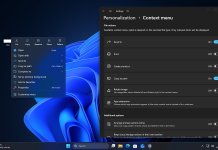
Microsoft is continuing its Windows 11 quality push with a stronger focus on the parts of the operating system users interact with most — the Taskbar and Start menu. Through recent Insider updates and Microsoft’s latest quality progress report, the company outlined multiple improvements designed to make Windows 11 feel faster, more customizable, and less frustrating in everyday use.
Since March, Microsoft has been refining core shell experiences, including the Start screen, Taskbar responsiveness, notifications, search behavior, and desktop interaction. These updates are part of a broader effort to improve usability after years of feedback around Windows 11’s limited customization and occasional UI lag.
Microsoft Is Refocusing on Core Windows Experiences
Microsoft says Windows quality work is no longer limited to bug fixes. The company is now prioritizing the fundamentals of Windows interaction — the areas users touch every day.
That means improving:
- Taskbar responsiveness
- Start menu speed
- Shell stability
- Search reliability
- Desktop interaction
- UI customization
These changes are rolling out gradually through Insider builds before reaching broader Windows 11 releases.
Taskbar Improvements Coming to Windows 11
The Taskbar has been one of the most criticized elements of Windows 11 since launch. Microsoft now appears to be actively addressing long-standing complaints.
More Taskbar Customization Is Coming
One of the biggest changes Microsoft confirmed is expanded Taskbar flexibility.
Future Windows 11 updates are expected to allow:
- Moving the Taskbar to the top of the screen
- Vertical Taskbar positioning
- Side-docked layouts
- Better workspace personalization
Taskbar repositioning has been one of the most requested Windows 11 features since launch, especially among power users and multi-monitor users. Microsoft says customization improvements are actively being developed.
Faster Taskbar Response Times
Microsoft is improving Taskbar performance to reduce lag and delayed interactions.
Recent work focuses on:
- Faster Taskbar loading after sign-in
- Reduced delay when clicking icons
- Smoother hover animations
- Better system tray responsiveness
- Faster pinned app launches
These improvements help the Taskbar feel more immediate during daily use. Explorer-related optimizations also contribute to quicker shell responsiveness.
Improved Taskbar Stability
Explorer.exe powers the Windows shell, including the Taskbar.
Microsoft has introduced fixes targeting:
- Taskbar freezing
- Missing icons
- Delayed icon refresh
- Random Taskbar reloads
- Crashes linked to desktop interaction
These refinements reduce instances where the Taskbar becomes temporarily unresponsive or refreshes unexpectedly.
Better Notification and Quick Settings Integration
Microsoft is refining how notifications and Quick Settings behave.
Expected improvements include:
- Faster opening of Quick Settings
- More reliable notification rendering
- Better media controls
- Improved brightness and sound toggles
- Reduced animation stutter
These upgrades improve fluidity when interacting with system controls from the Taskbar area.
AI and Smart Taskbar Features
Windows 11 is also gaining backend improvements for future Taskbar intelligence.
Microsoft recently added infrastructure allowing developers to integrate AI-powered agents and workflows through Taskbar-related APIs.
This could eventually support:
- Smarter contextual actions
- Better multitasking suggestions
- AI-driven shortcuts
- Improved assistant integration
Microsoft appears to be preparing the Taskbar for deeper AI integration without aggressively forcing features into the interface.
Start Menu Improvements Rolling Out
The Start menu remains central to Windows navigation, and Microsoft is making several refinements to improve usability.
Faster Start Menu Launching
One of the most noticeable improvements is speed.
Microsoft has been optimizing:
- Start menu opening animations
- Search indexing speed
- Pinned app loading
- Recommended section responsiveness
- Login-to-Start readiness
These changes reduce the delay some users experience when opening Start immediately after booting.
Improved Search Inside Start
Search reliability has become a major focus.
Windows 11 improvements include:
- Faster app discovery
- Better local file indexing
- More consistent search results
- Reduced missing results
- Improved query responsiveness
Search is increasingly tied to both local system indexing and cloud-enhanced suggestions. Microsoft is refining this balance to keep results relevant without slowing performance.
Better Start Menu Stability
Microsoft is also reducing Start menu glitches.
Recent improvements address:
- Delayed Start loading
- Broken Recommended section refresh
- Missing pinned icons
- Search freezing
- UI flickering during login
These fixes aim to make Start feel more stable during heavy multitasking and long sessions.
Cleaner Navigation Experience
Microsoft continues simplifying navigation behavior inside Start.
Changes may include:
- Better organization of pinned apps
- Improved spacing and scaling
- More predictable app layouts
- Cleaner transitions between sections
The goal is to make Start easier to browse without overwhelming users with unnecessary clutter.
Shell Performance Improvements Affect Both Taskbar and Start
Taskbar and Start performance depend heavily on the Windows shell.
Microsoft has introduced broader shell-level upgrades that improve both interfaces simultaneously.
Explorer.exe Reliability Improvements
Recent Windows preview updates include fixes for explorer.exe.
Benefits include:
- Faster desktop loading
- Improved Taskbar rendering
- Reduced shell crashes
- Better memory efficiency
- Smoother transitions between apps
Because Explorer powers the desktop environment, these fixes improve multiple Windows components at once.
Better Memory Usage
Windows 11 is reducing memory pressure caused by shell processes.
Microsoft is refining:
- Background caching
- Startup process prioritization
- UI rendering efficiency
- Resource allocation during login
This helps the Start menu and Taskbar remain responsive even on lower-end systems.
Reduced Login Lag
Many users experience delayed Taskbar or Start availability after signing in.
Microsoft is improving:
- Desktop readiness timing
- Background startup sequencing
- Faster shell initialization
- Better post-login responsiveness
This means users can interact with Windows sooner after booting.
Why These Windows 11 UI Changes Matter
Taskbar and Start are two of the most frequently used parts of Windows.
When these areas feel slow or unstable, the entire OS feels less responsive.
Microsoft’s latest quality initiative suggests the company is focusing less on flashy features and more on improving the core Windows experience.
Users benefit from:
- Faster navigation
- Better desktop responsiveness
- Reduced UI bugs
- Improved customization
- More reliable system interaction
These refinements may not dramatically change how Windows looks, but they significantly improve how it feels to use every day.
Final Thoughts
Microsoft’s recent quality updates show clear progress in improving Windows 11’s Taskbar and Start menu experience.
Faster performance, improved reliability, new customization options, and shell-level optimizations all point toward a more refined desktop experience.
As these improvements continue rolling out through Insider builds and preview updates, Windows 11 may finally address many of the usability complaints users have raised since launch.
Keep yourself updated with all latest news about Windows 11 by reading our full coverage here.
Please follow us on our Facebook page and X account for all latest and breaking Windows and Microsoft related news.