

Managing dozens of open windows on Windows has always been a chaotic game of Alt + Tab roulette. Microsoft developer Niels Laute recently shared that PowerToys version 0.101 is officially rolling out, and it brings one of the most practical workflow fixes to Windows in years: Window Hopper.
This release aligns with a broader shift by Microsoft toward optimizing legacy toolsets and system workflows—similar to recent overhauls seen in the redesigned Windows 11 Run dialog. Alongside this dedicated window switcher, version 0.101 introduces on-device local AI processing for clipboard tasks, an opt-in Insider build channel, and a streamlined compact layout for Command Palette.
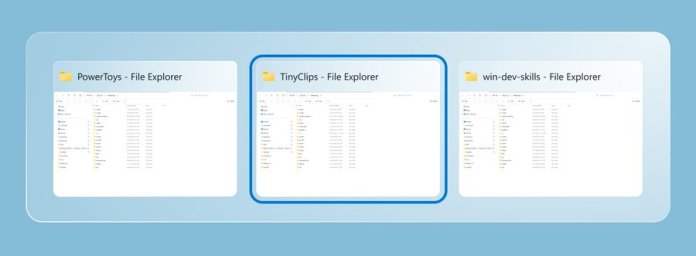
1. Window Hopper: Alt + Tab Strictly for the Active App
If you routinely work with five different Chrome windows, several VS Code instances, or multiple File Explorer tabs, standard Alt + Tab quickly turns into an unorganized mess.
Window Hopper acts as a localized switcher that cycles only through open instances of the active application.
Default Shortcut:
Alt +` (fully customizable in settings).How it works: Pressing the shortcut ignores every other running application on your system, jumping exclusively between windows of the app you are currently using.
Why it matters: It eliminates window hunting when working across multi-monitor setups or dense workspaces.
2. On-Device Local AI via Phi Silica in Advanced Paste
PowerToys’ Advanced Paste utility previously relied on cloud endpoints or custom OpenAI API keys to reformat or summarize clipboard text. With version 0.101, Microsoft is shifting the heavy lifting directly to your hardware.
Offline Processing: Advanced Paste now supports Microsoft’s Phi Silica Small Language Model (SLM) locally on supported hardware (such as Copilot+ PCs equipped with NPUs).
Privacy & Speed: Reformatting code, generating summaries, or cleaning up raw data now happens instantly on-device without data leaving your PC or requiring an internet connection.
3. Choose Your Track: Stable vs. Insider Channel
PowerToys updates are no longer an all-or-nothing affair. Following the pattern of community-driven tools like PowerToys Awake, users can now configure how they receive updates. Inside Settings > General > Update Channel, users can now choose between two distinct release paths:
Stable Channel: The standard release built for daily drivers where stability is paramount.
Insider Channel: An opt-in preview stream for power users who want early access to experimental utilities and UI tweaks before public releases.
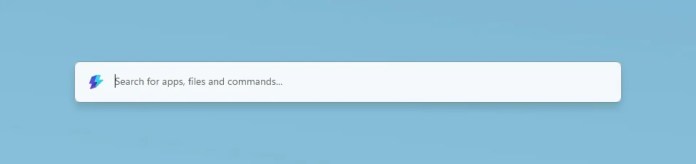
4. Command Palette Compact Mode & UI Modernization
The rest of the update packs meaningful quality-of-life polish across popular built-in tools as part of Microsoft’s wider Windows 11 performance strategy. The rest of the update packs meaningful quality-of-life polish across popular built-in tools:
Command Palette Compact Mode: A distraction-free UI view that stays minimal until you start typing search queries or commands.
PowerDisplay Control: You can now link display settings to adjust brightness simultaneously across multi-monitor setups, alongside new CLI options.
WinUI 3 Upgrades: Quick Accent and Mouse Jump get underlying framework updates for smoother high-DPI scaling, with Quick Accent adding a press-and-hold activation option.
ZoomIt DemoMirror: Presentation tools get a boost with screen mirroring, allowing presenters to stream specific app windows or cropped desktop areas to external displays.
Key Upgrades at a Glance
| Utility | New Feature | Practical Benefit |
| Window Hopper | Single-app switching (Alt + `) | Isolates navigation to active app instances |
| Advanced Paste | Local Phi Silica SLM support | Private, keyless text transformations on NPU |
| Settings | Insider Update Channel toggle | Easy opt-in for testing experimental builds |
| Command Palette | Compact View toggle | Saves screen real estate during keyboard navigation |
| PowerDisplay | Multi-monitor sync & CLI | Unified brightness control across all screens |
How to Update
Current PowerToys users can pull the update immediately via PowerToys Settings > General > Check for updates. The standalone installer for version 0.101 is also available on GitHub and the Microsoft Store.



