

Windows 11’s context menus are about to get a lot more useful.
Microsoft is working on a major update to the modern right-click context menu, adding more customization options while also making the menus cleaner and easier to navigate. The changes are currently in development, but they could significantly improve one of the most frequently used parts of Windows 11.
A New Settings Page for Context Menus
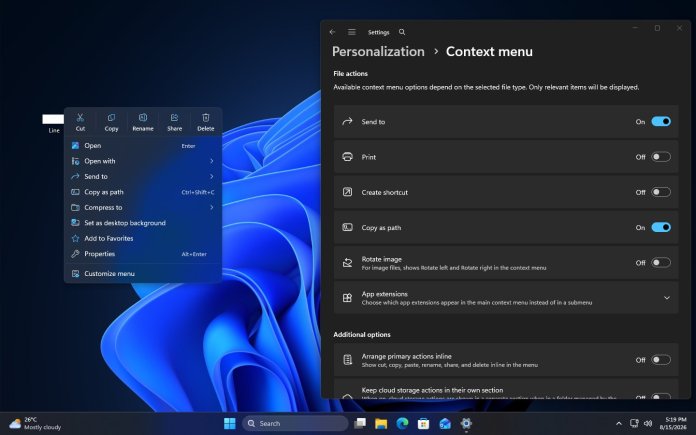
One of the biggest changes is a new Settings page dedicated to context menu actions.
The idea is simple: instead of being stuck with every available command, Windows 11 will give users more control over which actions appear in modern context menus. This should make it easier to remove commands you rarely use while keeping the options that matter most.
For users who prefer a cleaner Windows interface, this could be a welcome change.
“Send to” Is Finally Coming to Modern Context Menus
Another long-awaited addition is “Send to.”
The classic Windows context menu has offered the Send to command for years, allowing users to quickly send files to locations such as compressed folders, desktop shortcuts, or other destinations.
Microsoft is now working on bringing this functionality directly into the modern Windows 11 context menu, reducing the need to open the traditional menu to access the feature.
Refresh Will Be Available Everywhere
Microsoft is also expanding the Refresh command.
Refresh has become one of the most familiar options in Windows, but its placement and availability in modern context menus haven’t always been consistent. The upcoming changes are expected to make Refresh available across all folders, creating a more predictable experience.
It’s a small change, but one that could make Windows 11 feel considerably more consistent.
Context Menus Will Be Simpler by Default
The broader goal appears to be simplification.
Windows 11’s modern context menus were designed to be cleaner than the classic menus found in earlier versions of Windows. However, some users have felt that important commands were hidden behind additional menus, while other options weren’t immediately accessible.
Microsoft’s upcoming changes seem aimed at finding a better balance: simpler menus by default, with more control for users who want additional actions.
That could mean fewer unnecessary entries on screen without sacrificing functionality.
Why This Update Matters
Context menus may seem like a small part of Windows, but they’re something most PC users interact with constantly.
A better context menu can make everyday tasks—copying files, refreshing folders, sending items elsewhere, and accessing common commands—faster and less frustrating.
The combination of customizable actions, Send to support, broader Refresh availability, and a simpler default layout could make Windows 11’s modern context menus much more practical.
Microsoft hasn’t rolled out these changes to everyone yet, so the final implementation could still change before the features reach the stable version of Windows 11.
The Bottom Line
Windows 11’s context menus are finally getting the kind of flexibility many users have been asking for. A new settings page, Send to, Refresh across folders, and simpler menus by default could turn one of Windows’ most frequently used interfaces into a much more polished experience.
If Microsoft gets the balance right, this could be one of those small Windows 11 updates that makes the operating system feel noticeably better every day.
Stay tuned to WinCentral for all latest news about Windows 11 update related news and keep reading our full coverage here.
Please follow us on our Facebook page and X account for all latest and breaking Windows and Microsoft related news.



